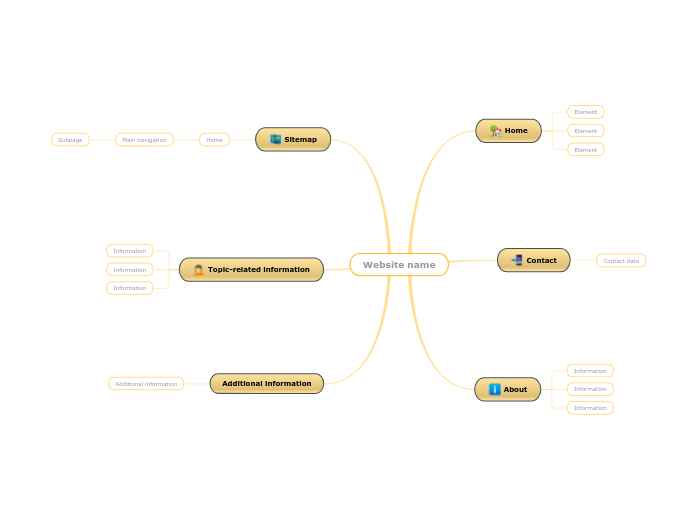
Use this mind map template to plan your future website. Think about the name and the structure of the website. Every website should have a Homepage, a “Contact” page, and an “About” page. Create a Sitemap and think about the main navigation and subpages names. Type in the name of your future website. What is the topic-related information you are going to include on your website? A sitemap is a file where you provide information about your website pages and files, and the relationships between them. They are used by Google to crawl your site. Every site needs a Homepage. Navigation refers to the different ways users can look through your site to find content. Subpage What will be the name of the Subpage from your website where the user should land? Create a page where you present yourself or the product you are going to promote through this website. Create a page where you will add your contact data. What are the elements you want to appear on the Homepage? 心智圖能幫助您集思廣益、建立概念之間的關聯,並整理與激發想法。 而心智圖範本讓入門更容易,因為範本是已含特定主題資訊與引導說明的架構。換句話說,範本先替您搭好能涵蓋該主題所有要素的結構,可作為您個人心智圖的起點。無論用於商業或教育,心智圖範本都能為特定主題的心智圖提供實用的解決方案。 Mindomo 提供智慧心智圖範本,讓您輕鬆工作、順暢思考。 您可以從 Mindomo 商業版或教育版帳號中挑選各式心智圖範本,也可以從頭建立自己的範本。只要在主題上加入進一步的引導說明,任何心智圖都能變成心智圖範本。關於此範本
How to plan your website structure?
Website name
Additional information
Topic-related information
You can include features of the product you are promoting.
If you are creating a personal website/blog, you can include more articles where you present yourself and talk about the things that you like.Sitemap
Organize your sitemap from the beginning so you have a more clear structure.
It serves as the first impression to the users who visit your site.
It should contain the most relevant information from your website.Main navigation
What is the name of a button on the Homepage that guides the user to the content?About
Information
What is the information about you that you are going to include on this website page?Contact
Contact data
What is the contact data you are going to add to your website?Home
Element
Type in the name of an element.
For example: 為什麼要使用 Mindomo 心智圖範本?
範本提供多種功能: