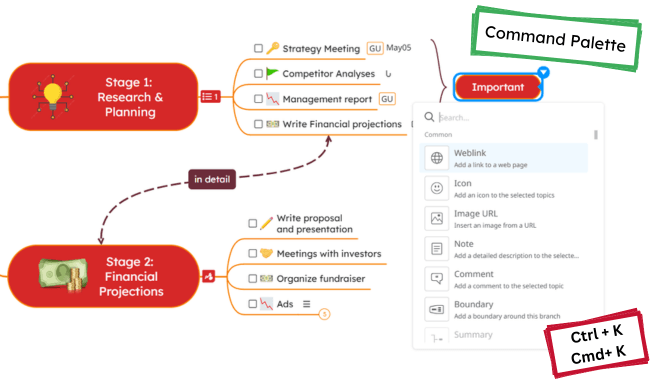
📢 We’re happy to share our new feature that will simplify editing your diagrams: the Command Palette! It’s a quick way to access any functionality you need without navigating through multiple menus. You can easily search and filter any feature in Mindomo simply by typing its name.
How Does It Work?
Open the Command Palette, select a topic, and then use Ctrl + K (Windows) or Cmd + K (Mac), or select it from the File List menu.
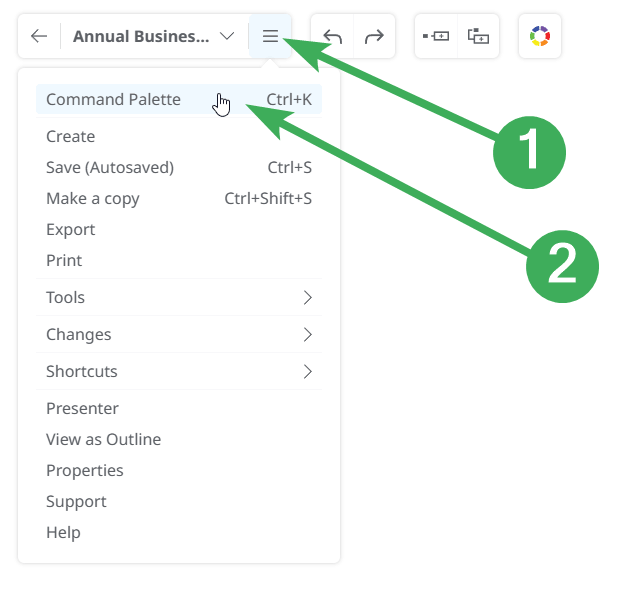
Command Palette will appear with a search bar. Type the name of the feature you’re looking for, and it will display all related options.

💡 For example: If you type “export,” all available export options and formats will appear, making it quick and easy to find exactly what you need with one click or an Enter.

Why Use the Command Palette?
- Simplified Workflow: No need to navigate through menus—search for features instantly.
- Enhanced Accessibility: Access any feature using your keyboard or in just a few clicks.
- Time Efficiency: Perform actions faster, saving time and effort.
ℹ️ Note on Shortcuts:
Previously, Ctrl + K (Windows) or Cmd + K (Mac) was used to turn topics into tasks. This functionality now has a new shortcut: Ctrl + Alt + T (Windows) or Cmd + Alt + T (Mac).
We believe the Command Palette will significantly enhance your Mindomo experience by making features more accessible and streamlining your workflow. Give it a try, and let us know what you think in the comments section!
Keep it smart, simple, and creative!
Silvana
The Mindomo Team