Enhance Your Mindomo Account Security with Two-Factor Authentication
Are you familiar with the additional security measures for your Mindomo account? We understand the importance of safeguarding your valuable diagrams and personal data, and Two-Factor Authentication is here to provide you with that extra peace of mind.
What is Two-Factor Authentication?
Two-Factor Authentication is an additional layer of security that goes beyond your traditional password. With Two-Factor Authentication enabled, logging into your Mindomo account requires entering your password and a unique code or secret key. This added step ensures that even if your password is compromised, unauthorized access to your account remains a challenge.
How to Enable Two-Factor Authentication?
To enable this enhanced security feature, follow these simple steps:
- Access My Account: Click on your profile initials or picture located on your Mindomo Dashboard.
- Navigate to Account Settings: From the dropdown menu, select “Account.”
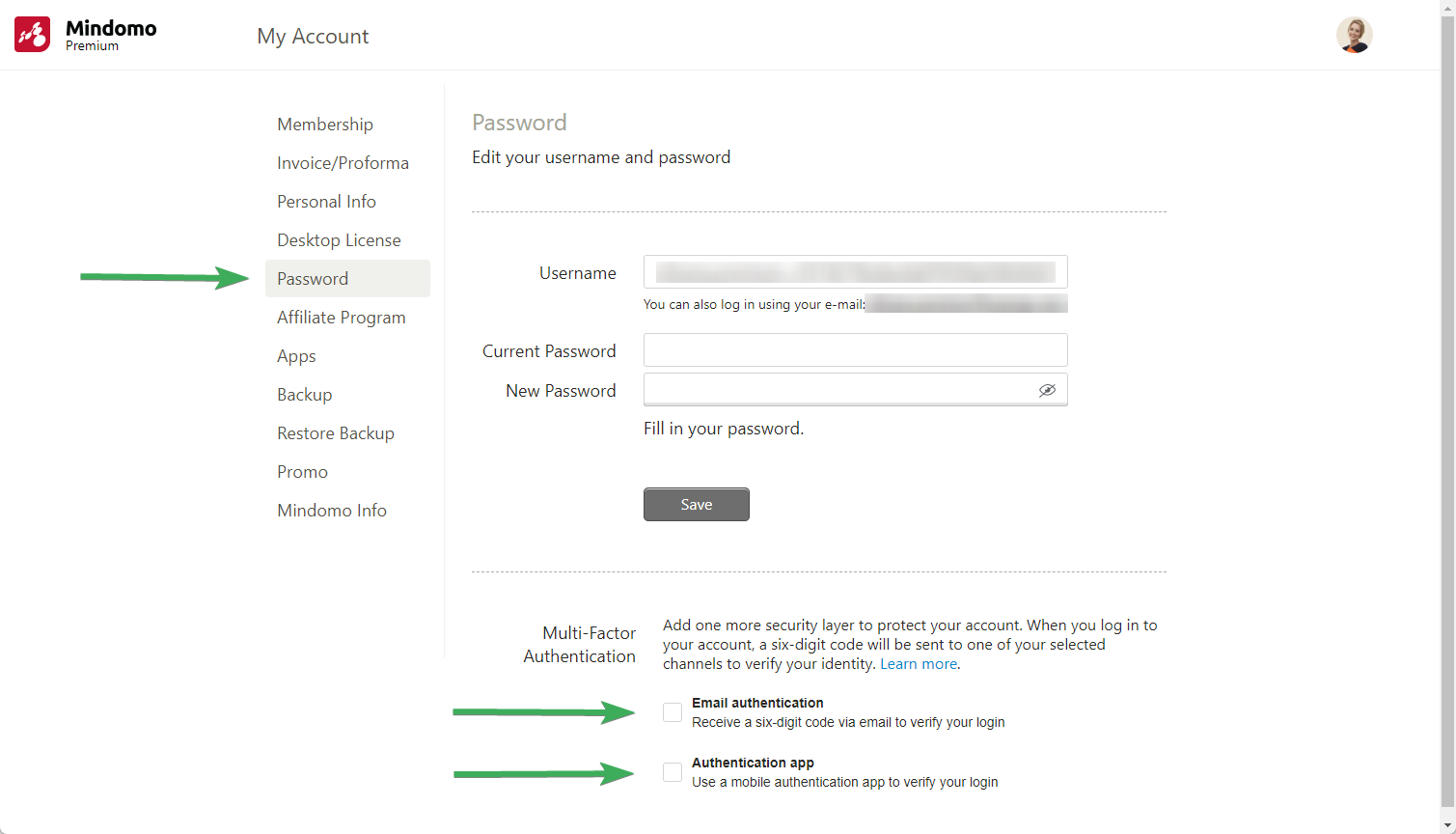
- Set Up Two-Factor Authentication: In the Account section, find the “Password” option and select it.
- Choose Your Method: You will have the option to choose between two methods for Two-Factor Authentication:
- Email Authentication: Receive a unique code via email whenever you log in.
- Authentication App: Use a trusted authentication app (like Google Authenticator, Microsoft Authenticator, 2FAS Auth, etc.) to generate codes.
Why Should You Enable Two-Factor Authentication?
We highly recommend enabling Two-Factor Authentication for your Mindomo account. Your security is our priority, and this feature is designed to provide you with the best protection.
- Enhanced Security: Protect your mind maps and personal data with an additional layer of security.
- Reduced Risk: Even if your password is compromised, unauthorized access becomes highly unlikely.
- Peace of Mind: Feel confident that your valuable content is safe and secure.
If you have any questions or need assistance setting up Two-Factor Authentication, please don’t hesitate to contact our support team. We’re always here to assist you.
We’d also love to get your feedback about this feature in the comments.
Thank you for being a part of the Mindomo community, and stay secure!
Keep it smart, simple, and creative!
Silvana
The Mindomo Team