Subscription Upgrades are Now Available: Switch your Plan in Seconds

We’re thrilled to announce that you can now upgrade your active plan, paying only the difference based on the remaining time of your current subscription.
If you’re on a plan but want access to additional features, for example, you have a Premium subscription, but you decide you want to have guest users (that is a Professional feature) - now you can make a straightforward transition. You don’t have to cancel your current plan and then purchase a new one.
How to upgrade your plan?
1. Click on your initials/picture from your Dashboard, then click on “Account”.
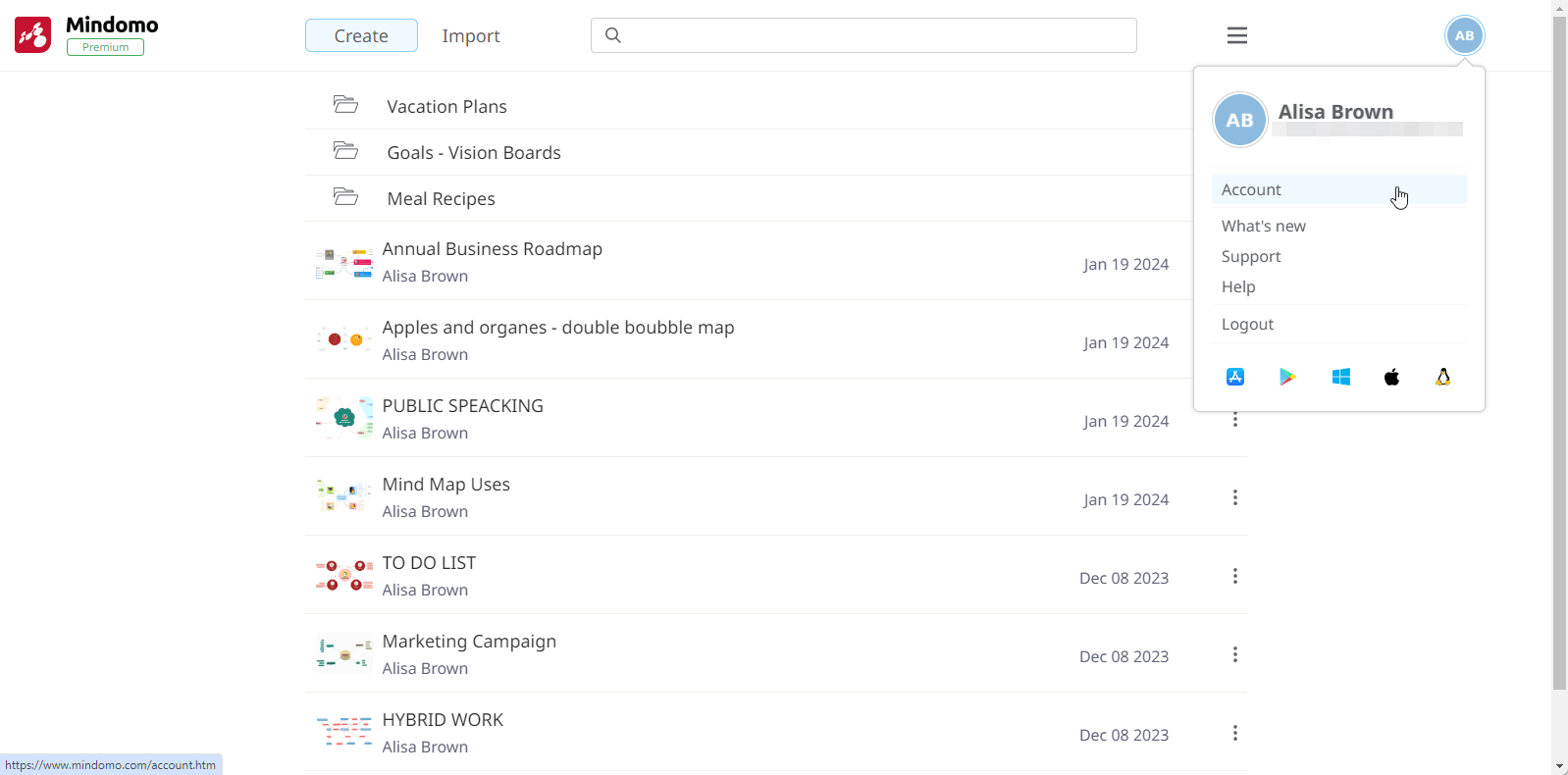
2. In the My Account section, click on Switch to Another Plan.

3. Select the account you’d like to upgrade your current subscription.

4. You’ll find a detailed breakdown of the remaining payment amount. After completing the purchase, your account will be upgraded to the plan you selected for the remaining duration of your initial license period.

Switching your plan is as simple as that.
Stay tuned to our forum for upcoming news, tips, and discussions on maximizing your Mindomo experience. Thank you for being valued members of the Mindomo community, where innovation and creativity come together.
We value your feedback, so please share your thoughts in the comments.
Keep it smart, simple, and creative!
Silvana
The Mindomo Team